 Previzion
Reference
All menus
Every item in the five menus of the menu bar at the top of the app, in one place. Greyed-out items cannot be used on the current screen.
On a Mac the menus are in the menu bar at the top of the screen, and shortcuts use ⌘ where this page says Ctrl.

| # | Menu | What is in it |
|---|---|---|
| ① | File | Making, opening, saving and restoring projects, .pvz files, exporting the movie, signing in |
| ② | Edit | Undo, copy and paste in the scene |
| ③ | View | The four steps, the Scene page's panels, timeline zoom, the window |
| ④ | Settings | Scene model, viewport display, language |
| ⑤ | Help | The user guide, shortcuts, feedback, app information |
File
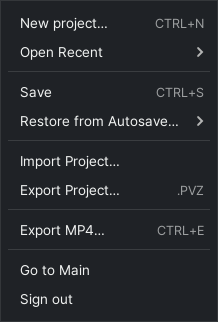
| Item | What it does | Shortcut |
|---|---|---|
| New project… | Makes a project and opens it | Ctrl+N |
| Open Recent | Opens a project you opened recently | |
| Open Recent → All Projects… | Opens the full list on the main screen | |
| Save | Saves the open project | Ctrl+S |
| Restore from Autosave… | Goes back to an autosaved moment | |
| Import Project… | Opens a .pvz file as a new project |
|
| Export Project… | Saves the project as a single .pvz file |
|
| Export MP4… | Goes to the Export step | Ctrl+E |
| Go to Main | Closes the project and goes to the main screen | |
| Sign in… | Signs in through your browser. Shown only when you are signed out | |
| Sign out | Signs out on this computer. Shown only when you are signed in |
To quit the app, close its window. How these are used is covered in Managing projects.
Edit
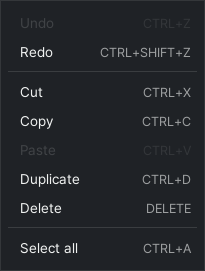
| Item | What it does | Shortcut |
|---|---|---|
| Undo | Takes back the last edit | Ctrl+Z |
| Redo | Does an undone edit again | Ctrl+Shift+Z · Ctrl+Y |
| Cut | Copies, then deletes | Ctrl+X |
| Copy | Copies the selection | Ctrl+C |
| Paste | Pastes what you copied | Ctrl+V |
| Duplicate | Makes a copy of the selection right beside it | Ctrl+D |
| Delete | Deletes the selection | Delete · Backspace |
| Select all | Selects every object in the scene | Ctrl+A |
The Edit menu works at the Scene step, on what you selected in the 3D view, the Objects panel or the timeline.
View
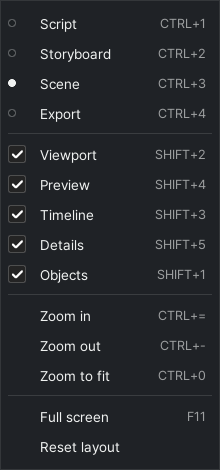
| Item | What it does | Shortcut |
|---|---|---|
| Script | Goes to the Script step | Ctrl+1 |
| Storyboard | Goes to the Board step | Ctrl+2 |
| Scene | Goes to the Scene step | Ctrl+3 |
| Export | Goes to the Export step | Ctrl+4 |
| Viewport | Shows or hides the Viewport panel | Shift+2 |
| Preview | Shows or hides the Preview panel | Shift+4 |
| Timeline | Shows or hides the Timeline panel | Shift+3 |
| Details | Shows or hides the Details panel | Shift+5 |
| Objects | Shows or hides the Objects panel | Shift+1 |
| Zoom in | Zooms the timeline in | Ctrl+= |
| Zoom out | Zooms the timeline out | Ctrl+- |
| Zoom to fit | Fits the whole scene on the timeline | Ctrl+0 |
| Full screen | Makes the window fill the screen, or puts it back | F11 |
| Reset layout | Puts the panels back where they started |
The panel items and Reset layout work at the Scene step.
Settings
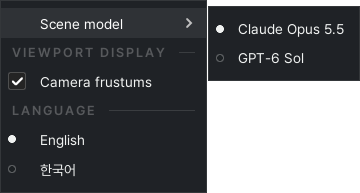
| Item | What it does | Shortcut |
|---|---|---|
| Scene model → Claude Opus 5.5 · GPT-6 Sol | Picks the AI model that makes and edits the scene | |
| Camera frustums (Viewport display) | Draws each camera's field of view in the viewport | |
| English · 한국어 (Language) | Changes the app's language |
Help
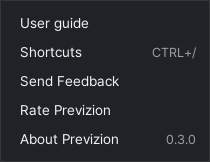
| Item | What it does | Shortcut |
|---|---|---|
| User guide | Opens this guide in your browser | |
| Shortcuts | Shows every shortcut on a card | Ctrl+/ |
| Send Feedback | Reports a bug or sends a question or idea | |
| Rate Previzion | Sends a star rating of how it went | |
| About Previzion | Shows the app version |
Send Feedback and Rate Previzion are covered in Sending feedback.
Related: Shortcuts · Managing projects · The Scene page and the 3D view
Anything not covered here: ask in the open chat or write to 17iayn@gmail.com.