 Previzion
Export · sharing
On this page you save the finished scene as an MP4 movie and share it as a link.
On a Mac, press ⌘ instead of Ctrl.
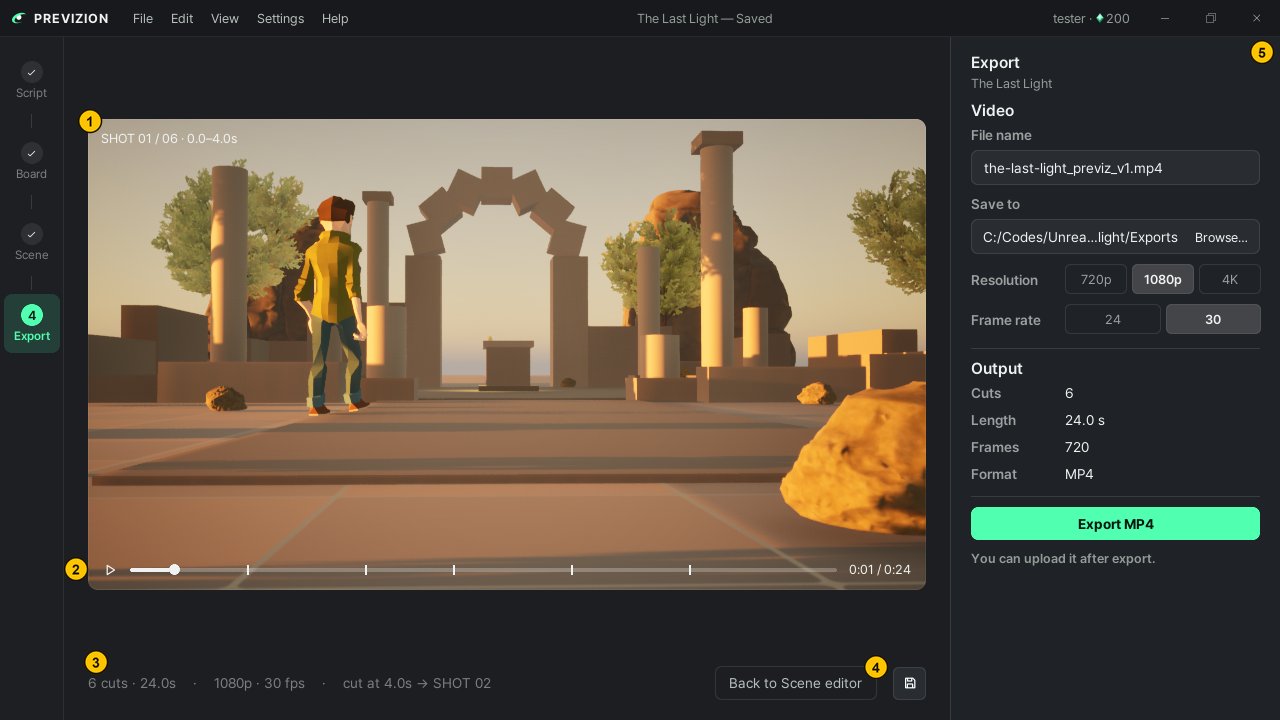
| # | Area | What it does |
|---|---|---|
| ① | Preview | Plays the movie as it will come out (Space) |
| ② | Playback bar | Drag it to the cut you want to see. The ticks mark where cuts change |
| ③ | Info line | Shows the number of cuts, the length, and the resolution and frame rate to export at |
| ④ | Back to Scene editor | Goes back to the Scene page if you spot something to fix |
| ⑤ | Export panel | Set up the movie and export it |
Saving as a movie
- Press Export in the step bar (Ctrl+E).
- Watch the movie to the end in the preview.
- Pick the resolution and frame rate in the panel on the right. How to choose is below.
- Press Export MP4. If it fails, the panel shows the reason and Try again.
You cannot use the app while the movie is being made. The panel shows the time left; to stop, press Cancel.
Choosing the settings
| Setting | How to choose |
|---|---|
| Resolution | 720p for a quick look, 1080p for most uses, 4K for a big screen. The shape follows the scene's aspect ratio |
| Frame rate | 24 or 30, plus the scene's own rate when it is 25, 48, 50 or 60. It starts at the scene's own value |
| File name · Save to | Leave them and the movie is saved under a name that does not clash, in the Exports folder of the project folder. If the name is taken, it tells you it will overwrite |
Checking the result
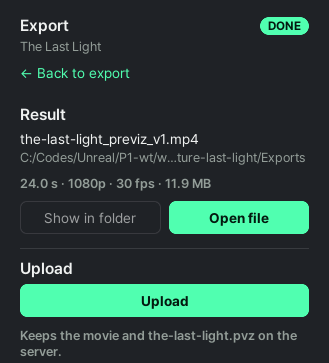
When the movie is done, the panel turns into the result view. Play it right away with Open file, or open where it was saved with Show in folder.
Sharing a link
- Press Upload in the result view. The movie and the project file (
.pvz) go up together. - When the upload is done, a share link appears. Copy it with Copy link and send it.
You can go to another step while it uploads; a notification brings the link when it is done. Upload again and it stacks up as v2, v3 …, and uploaded movies can also be seen on this site's Board.
Related: The Scene page and the 3D view · Managing projects · Viz · saving · what is sent · When something goes wrong
Anything not covered here: ask in the open chat or write to 17iayn@gmail.com.